Open-source digital signage for Raspberry Pi

Turn your TVs into an advertising wall you run from your phone.

AdScreen plays your videos, images and QR codes on one or two TVs from a Raspberry Pi. Rotate them, split them, join them, mute them or switch them off, all from a simple page on your phone.

£9.99 one-time · no subscription · pay with PayPal
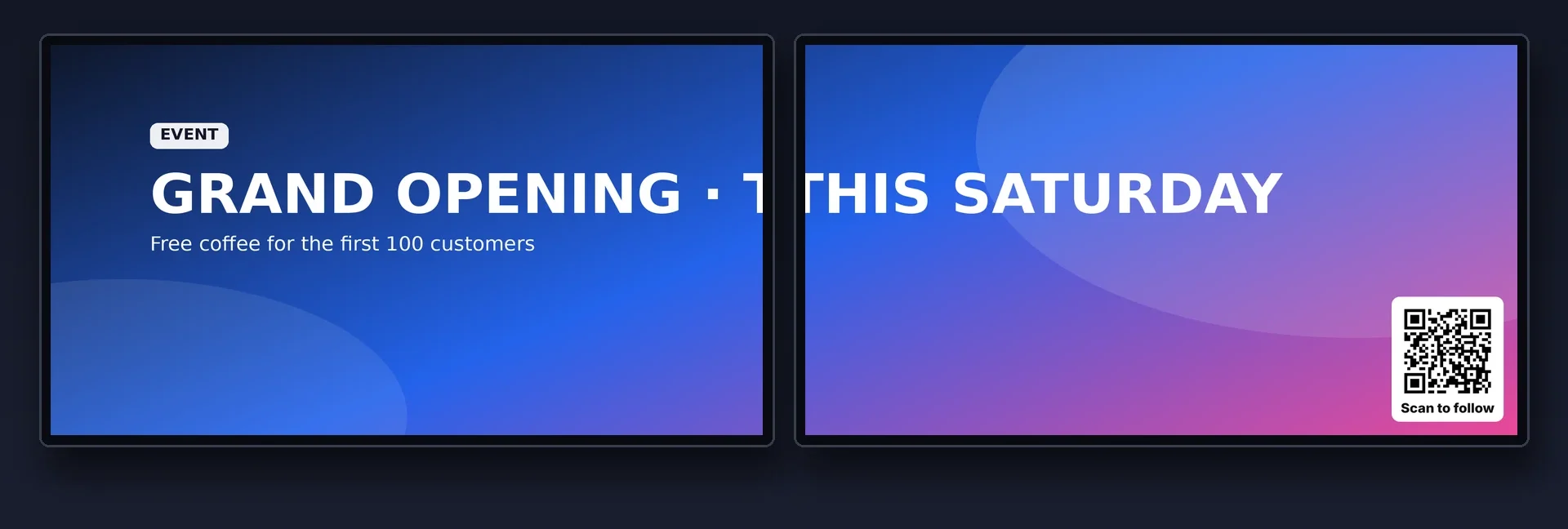
Two TVs showing one advert stretched across both, with a QR code in the corner
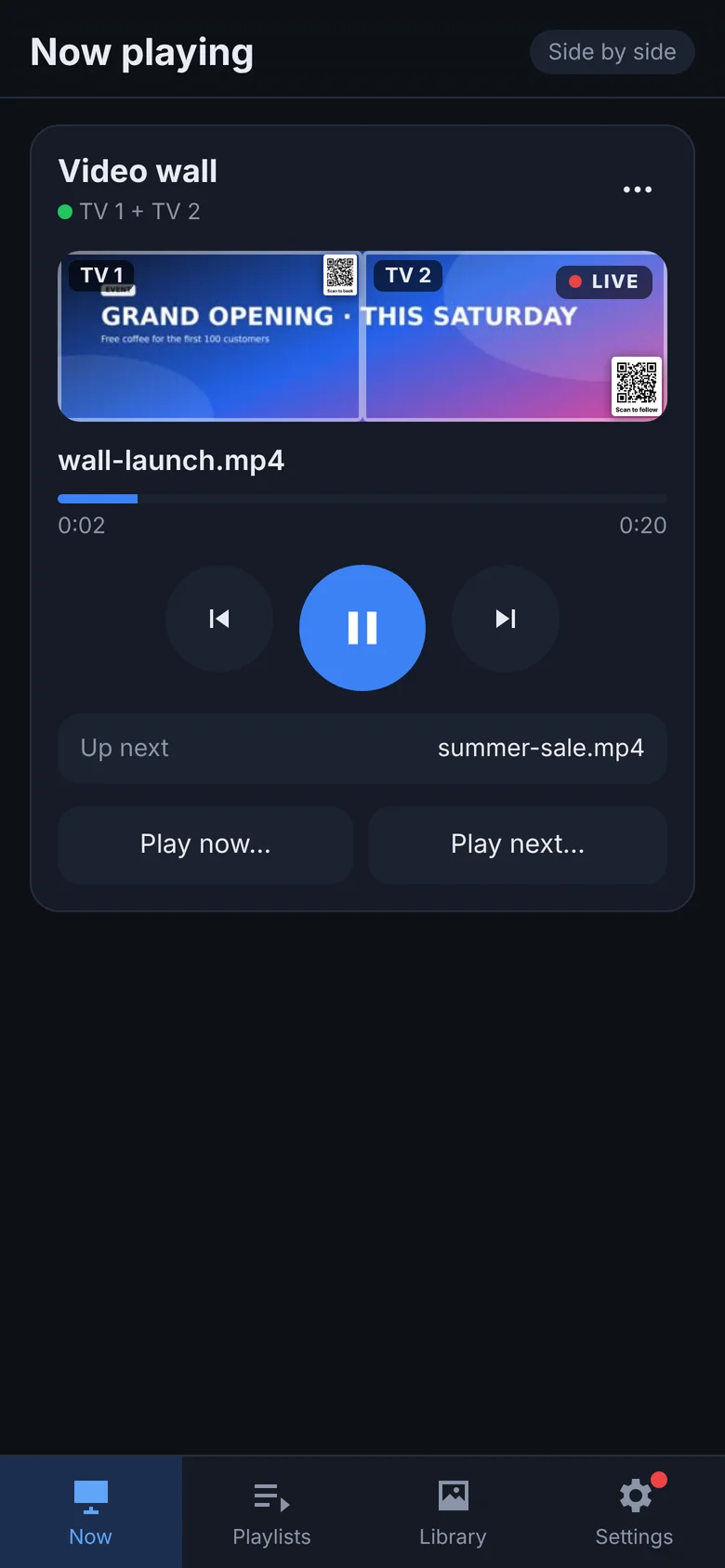
AdScreen control page showing the video wall live
Remote control from your phoneEach screen independentRotate each TV Turn screens on & offSound on the TV you chooseAutomatic resolution detection QR codes in any cornerEasy video libraryOne-tap updates
Remote control

Your phone is the remote

Open AdScreen in your phone's browser, with no app to install, and control everything from anywhere in the shop.

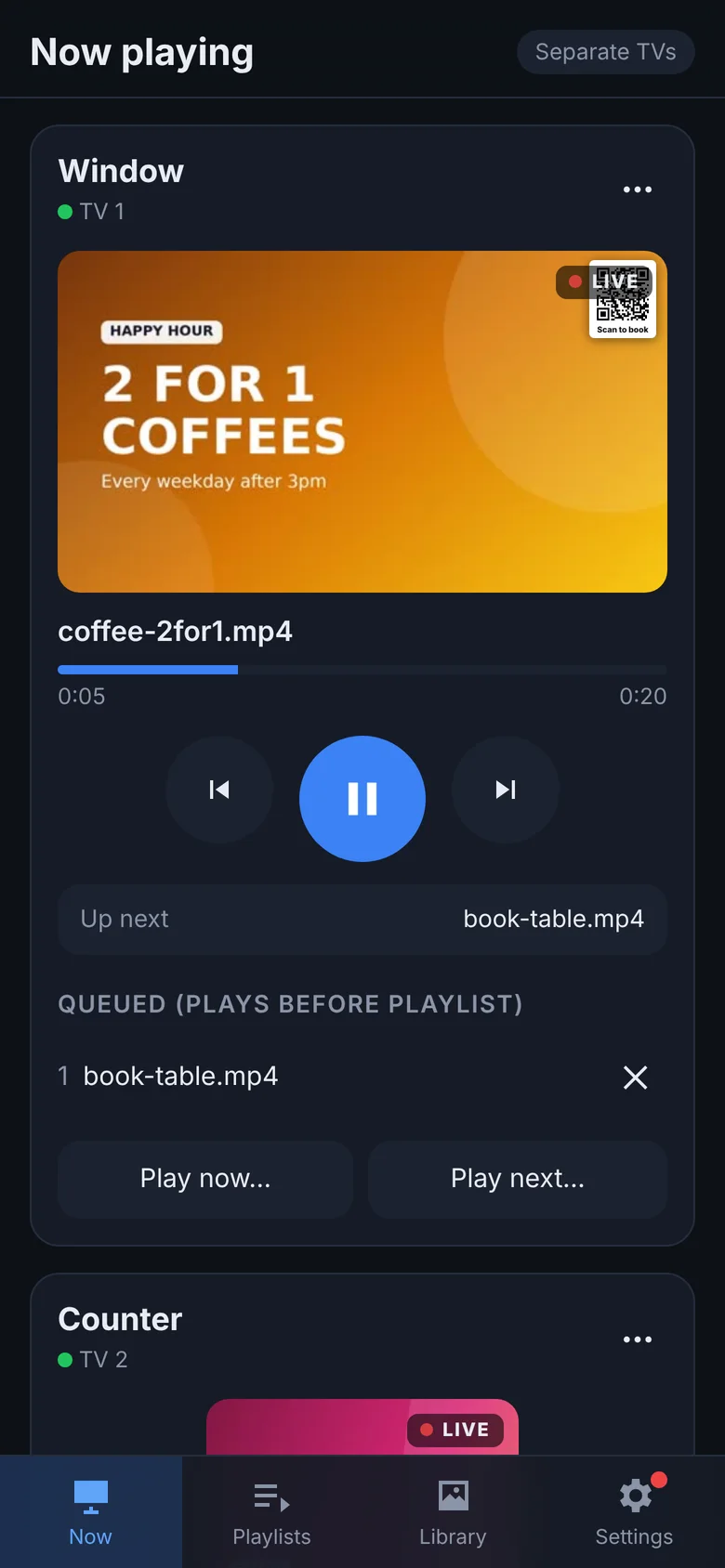
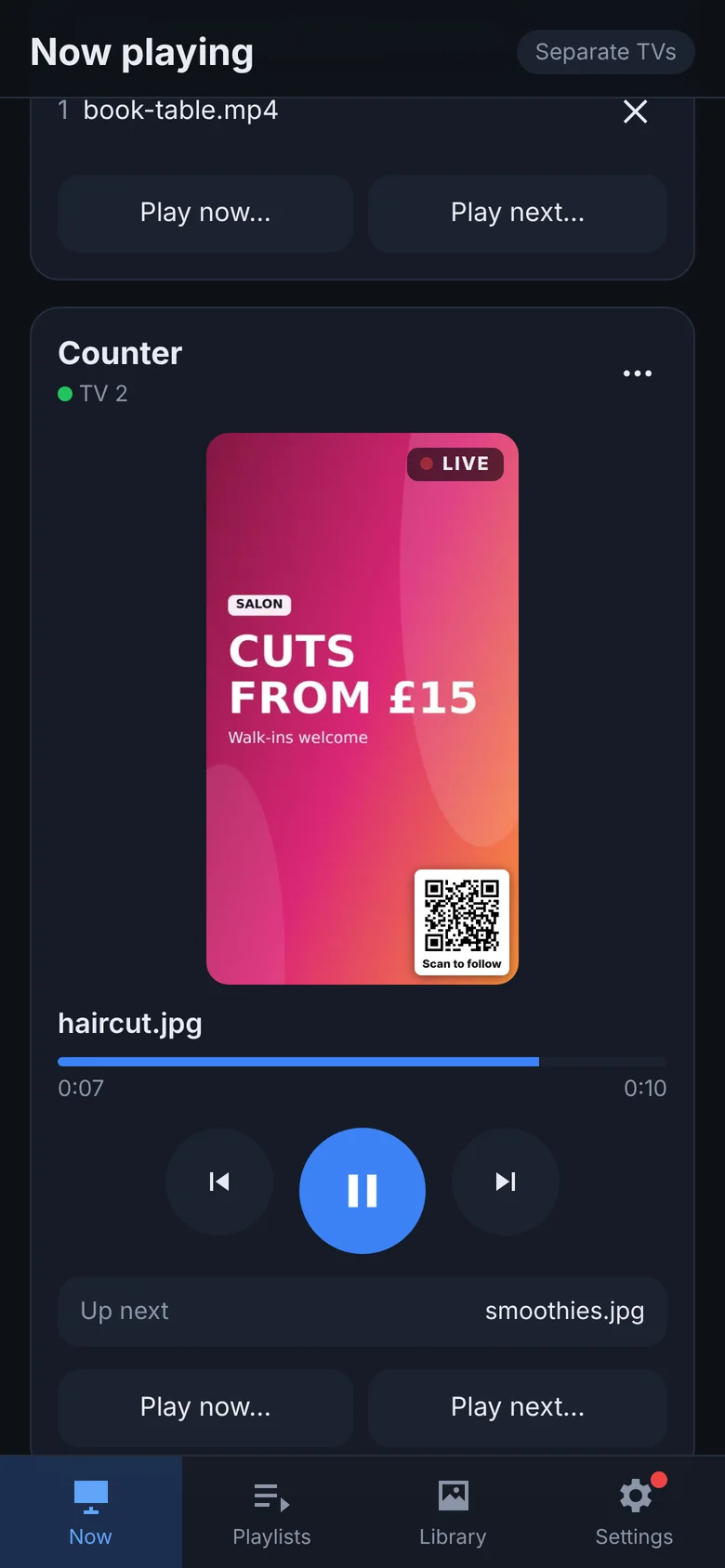
  • Live view shows exactly what's on each TV right now.
  • Play now jumps straight to an advert. Play next queues it up.
  • Skip, go back, pause or blank a screen to black in one tap.
  • Password protected, so only your team can change what plays.
  • Add it to your Home Screen and it opens like an app.
Now playing page with live view of the Window TV
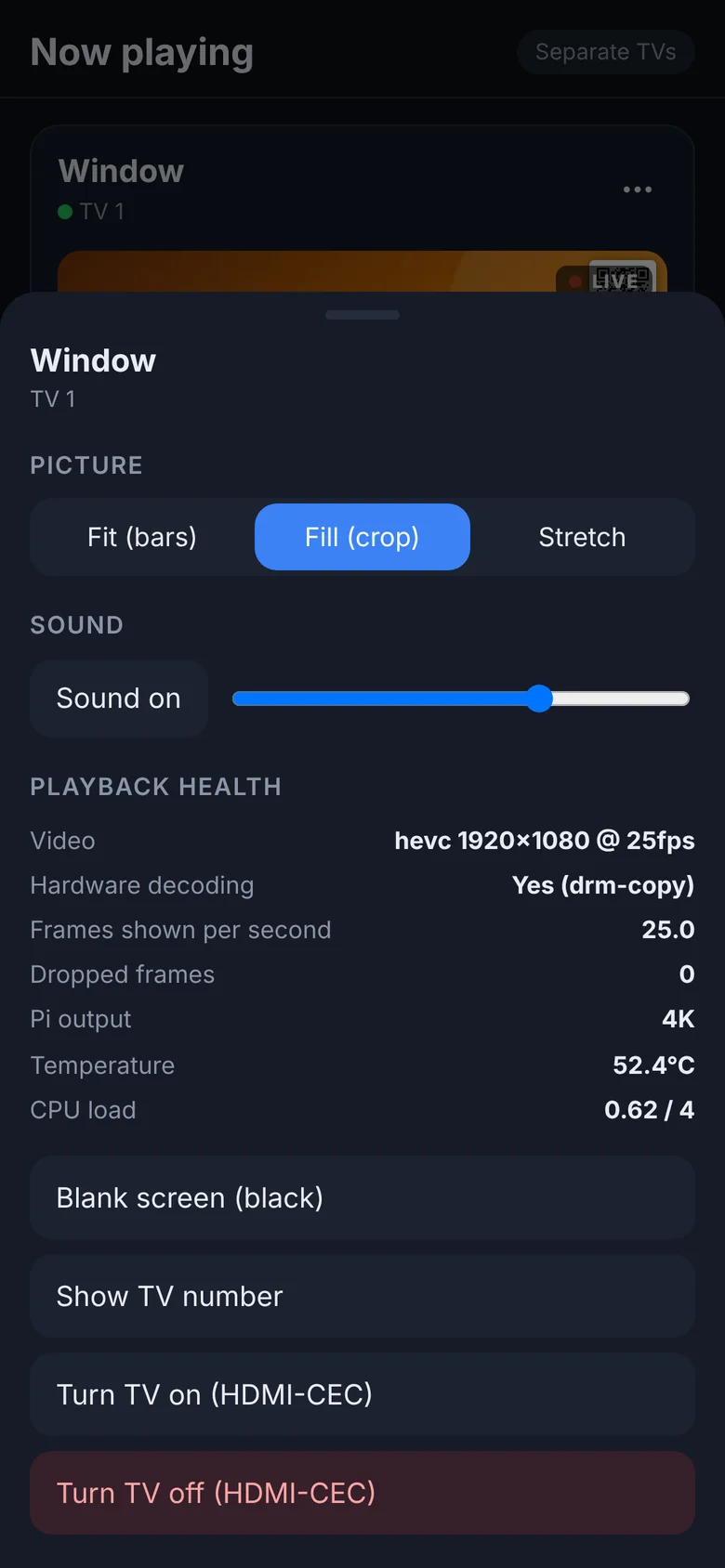
Screen options: picture fit, sound, playback health
Independent screens

Two TVs, two completely different jobs

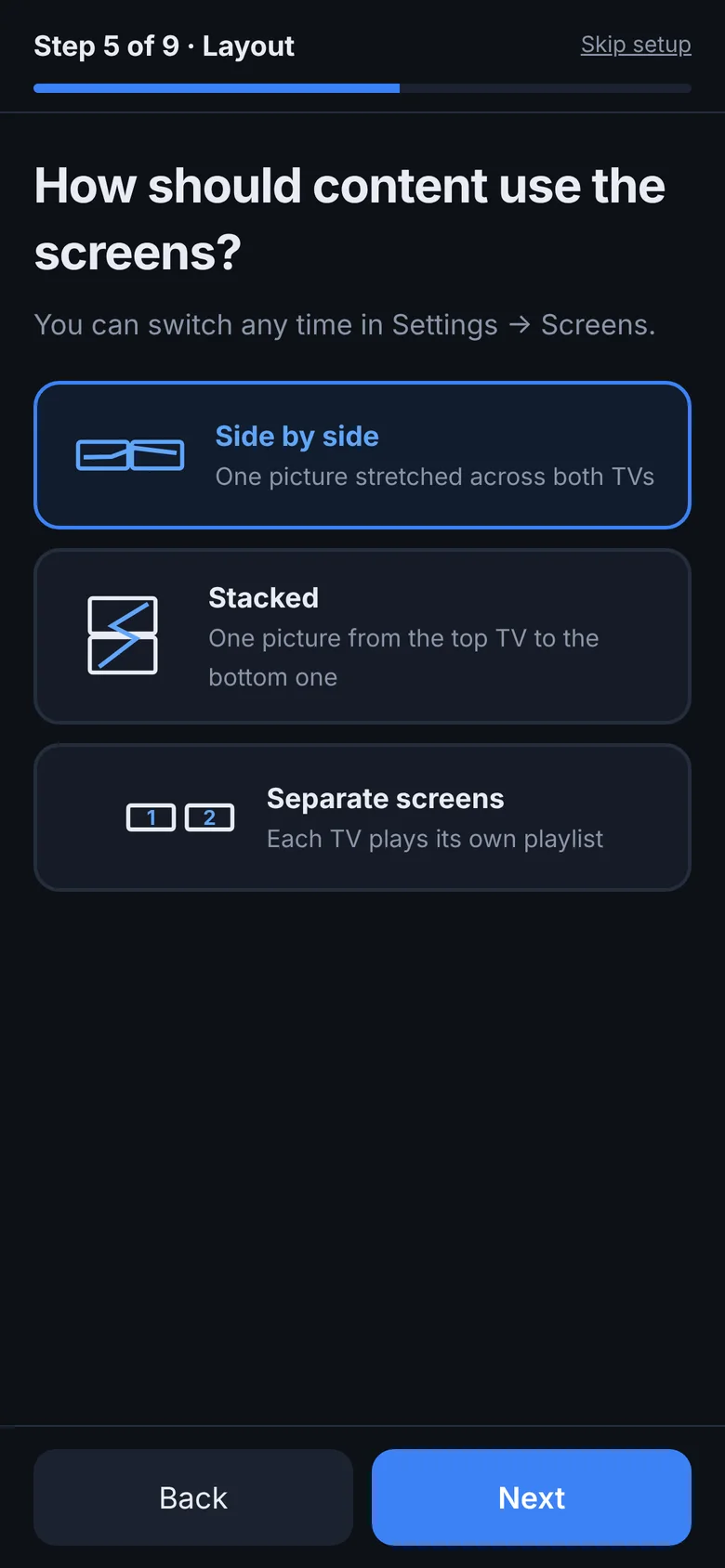
Run each TV on its own: its own playlist, its own adverts, its own QR code. Or join them into one giant picture.

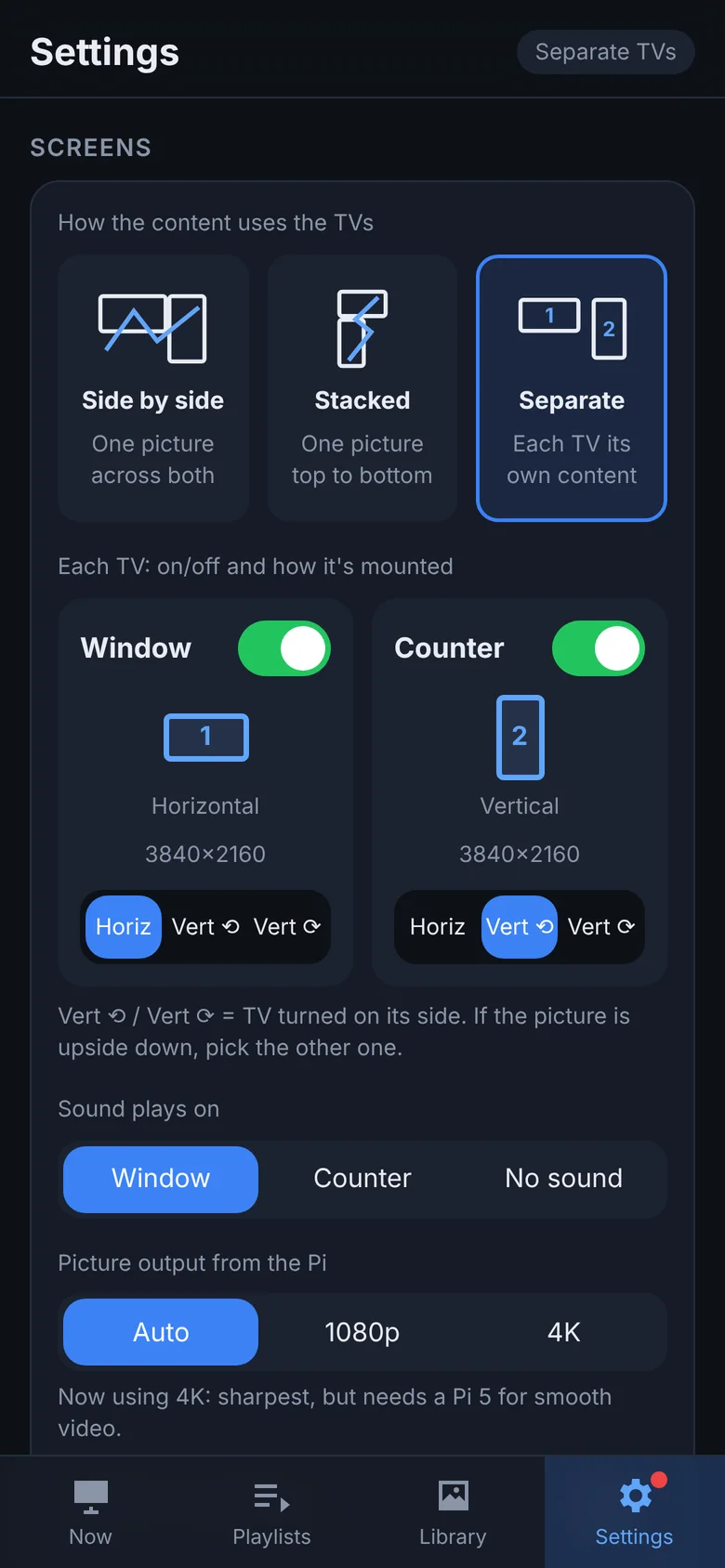
  • Separate: TV 1 shows your offers while TV 2 shows your menu.
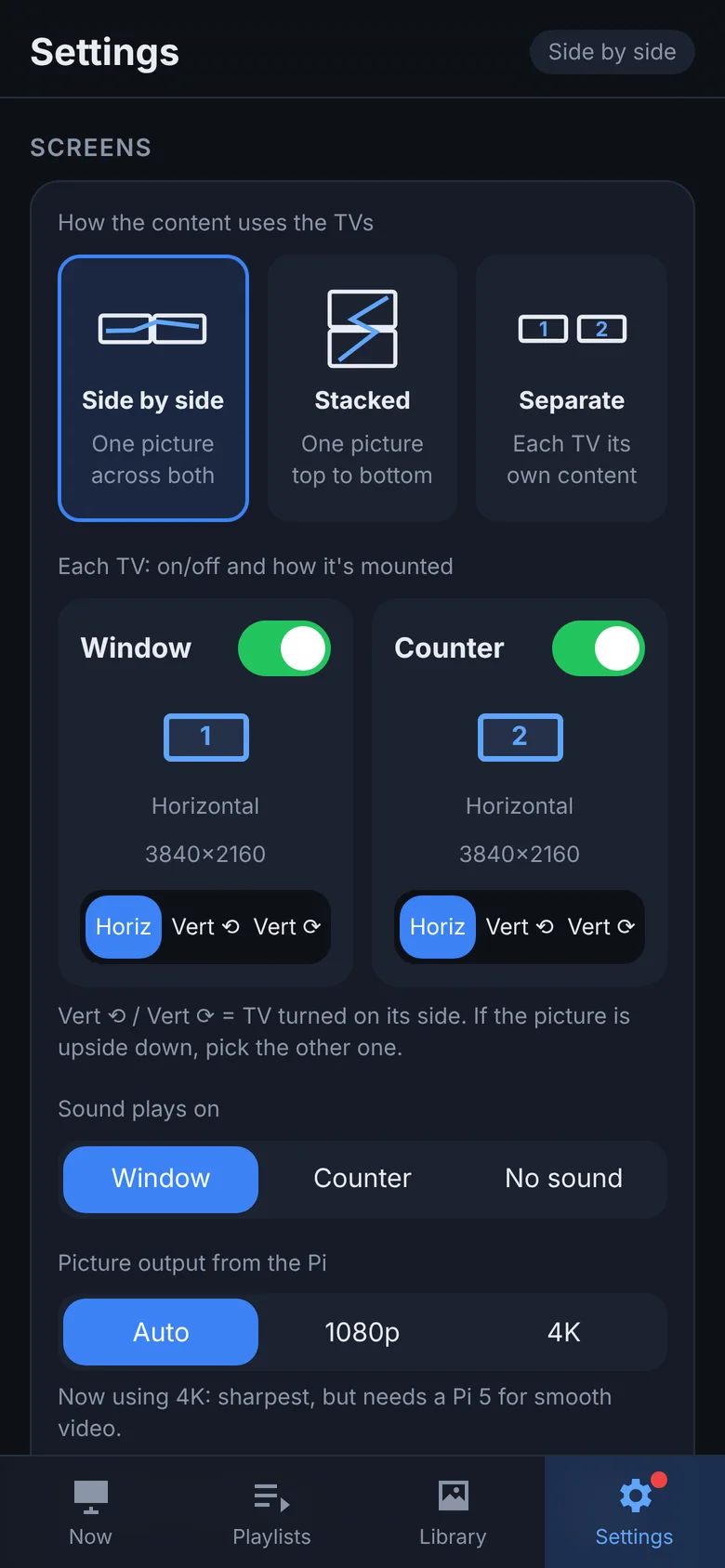
  • Side by side: one wide advert stretched across both TVs.
  • Stacked: one tall picture running top to bottom.
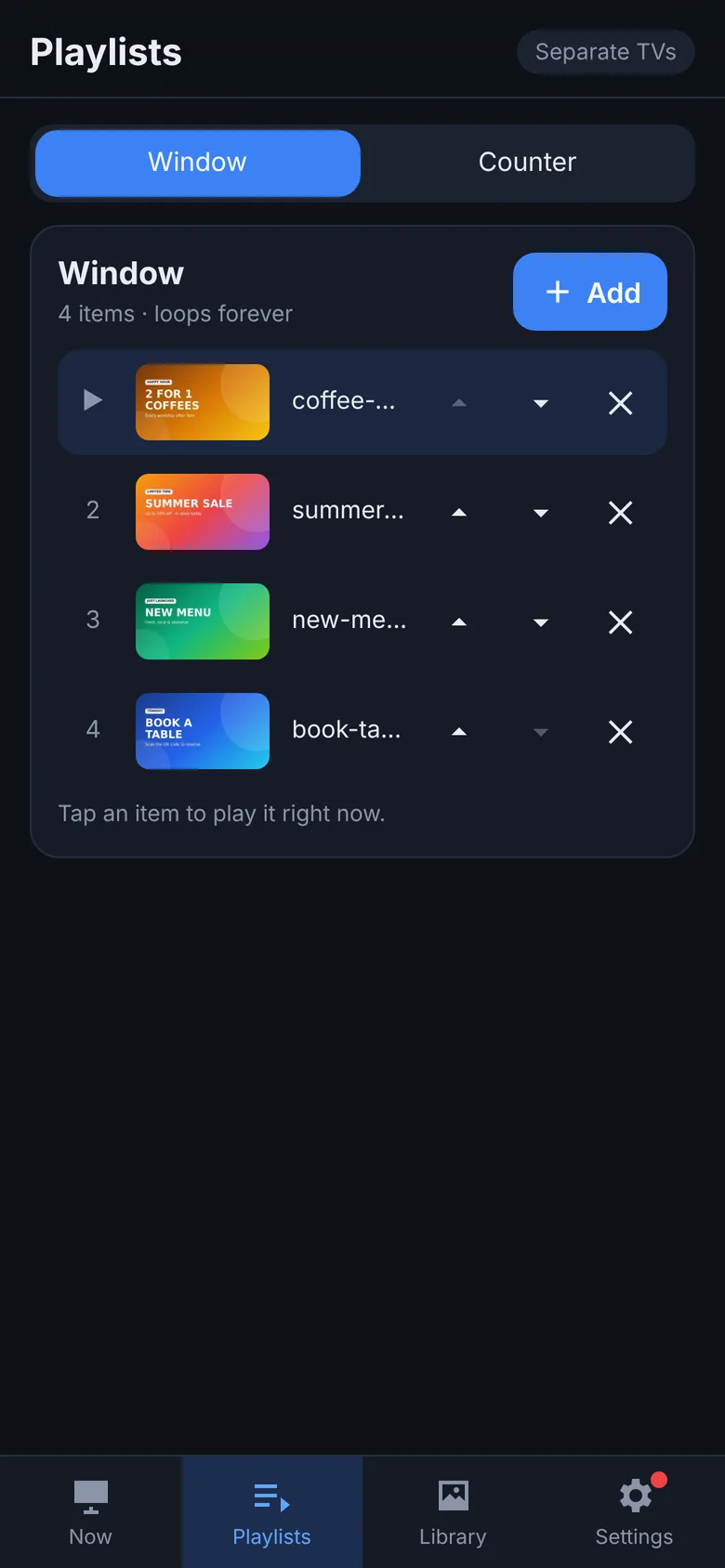
  • Each screen has its own looping playlist, and its own play now / next queue.
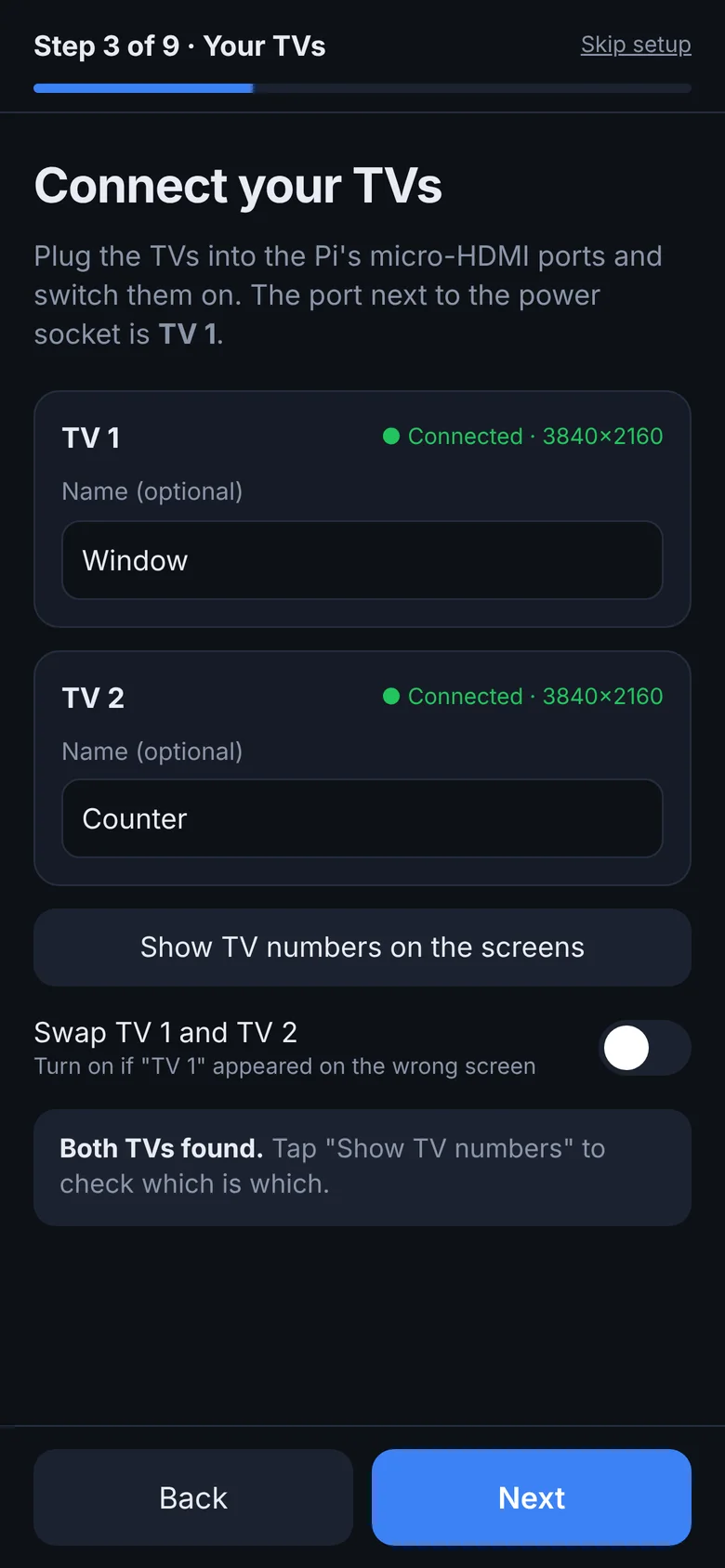
  • Name your TVs ("Window", "Counter") so everyone knows which is which.
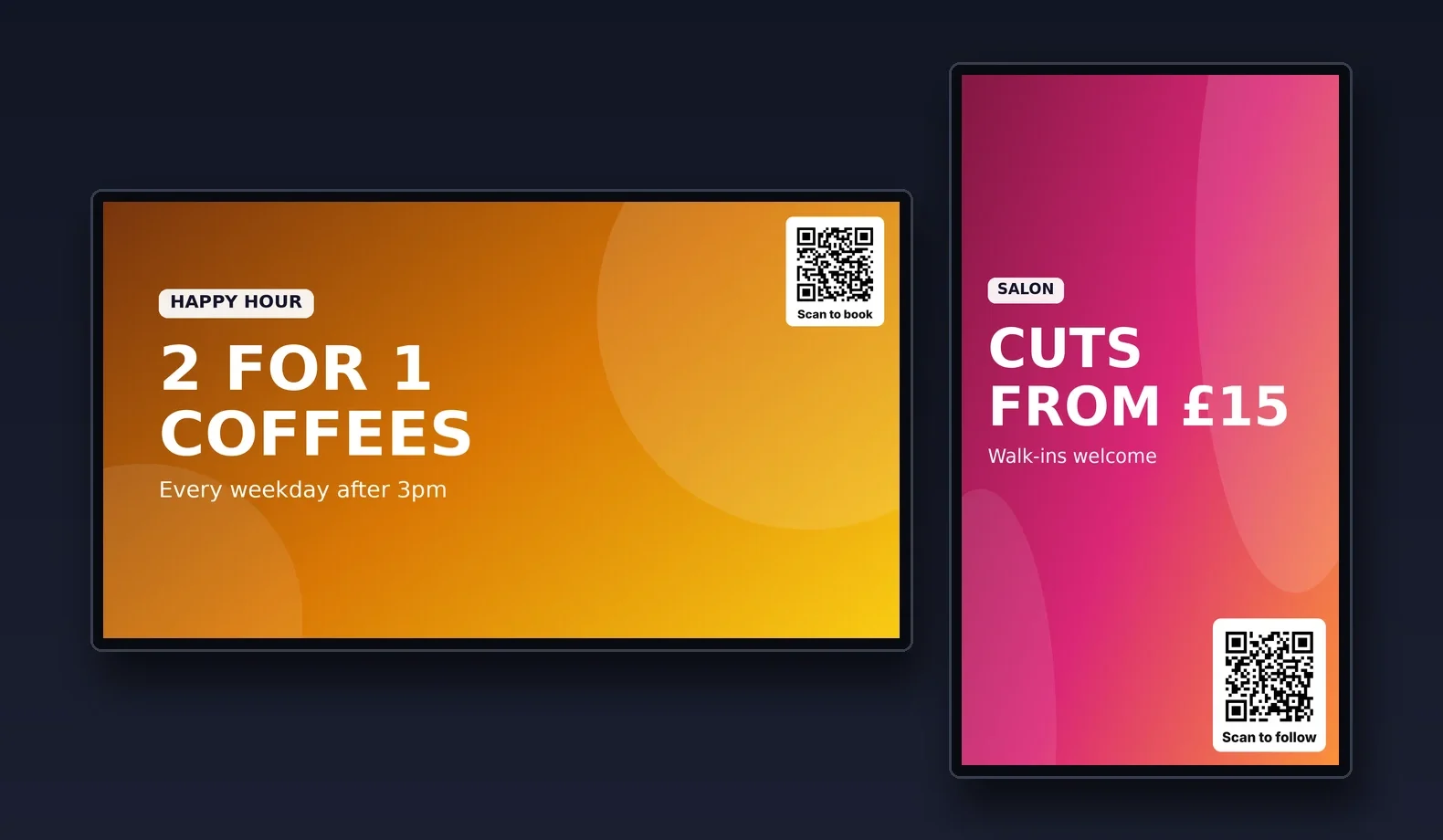
A landscape TV and a portrait TV showing different adverts
Two screens with different content
Playlist for one screen
Rotate · on/off

Rotate each TV, and turn each one on or off

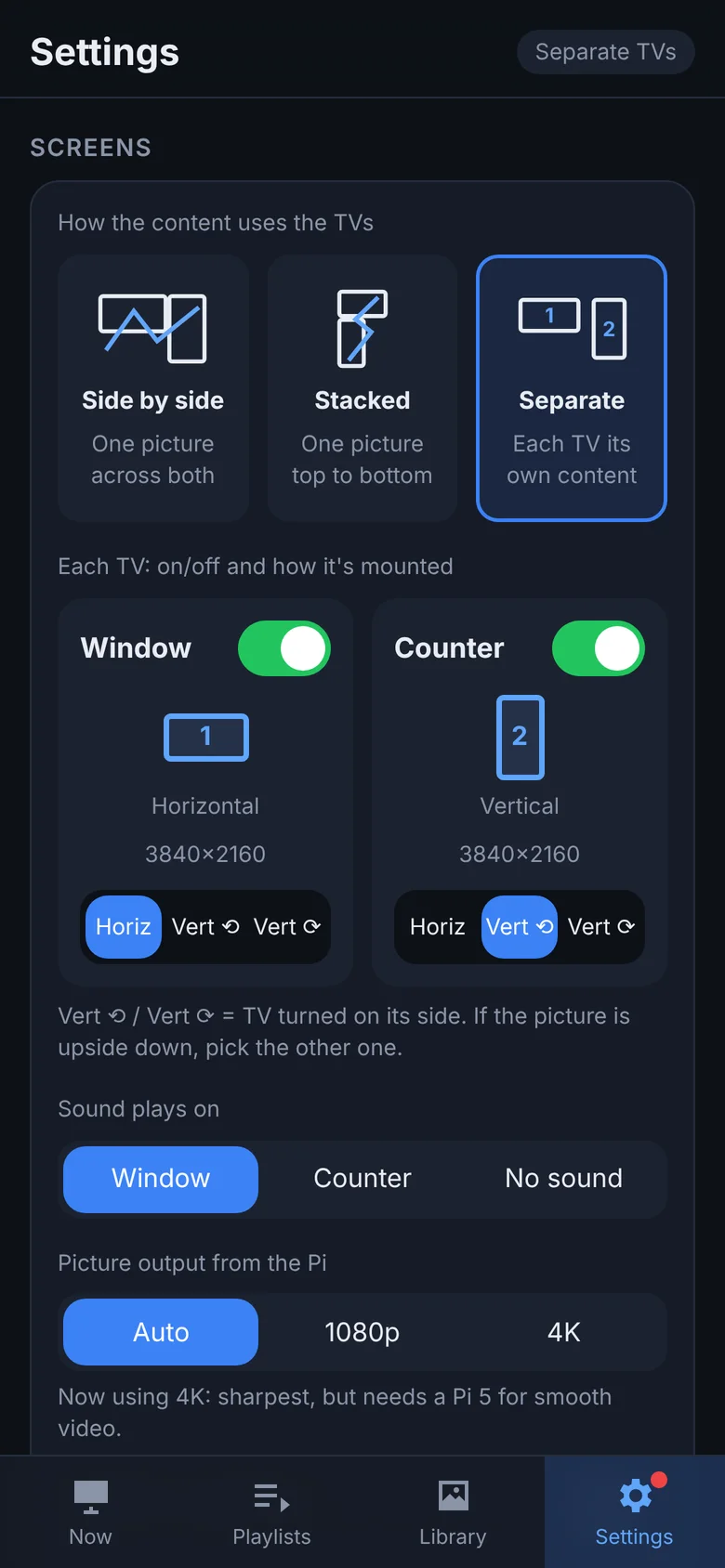
Every TV has its own controls in Settings → Screens.

  • Horizontal, Vertical ⟲ or Vertical ⟳ for each TV, so portrait screens are never upside down.
  • Mix and match: a landscape TV next to a portrait one works fine.
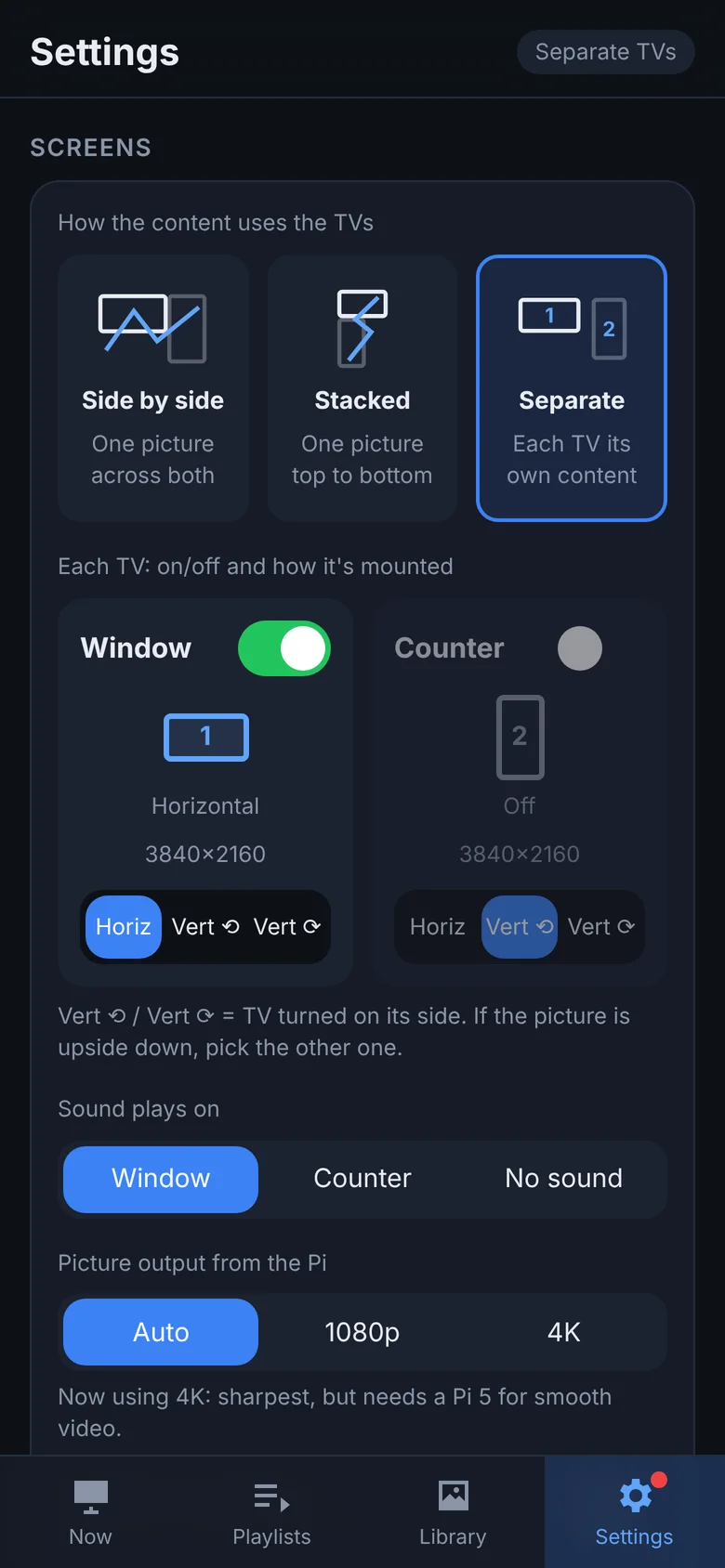
  • On/off switch for each TV: turn one off and the content carries on full-size on the other.
  • TV standby and wake-up from your phone using HDMI-CEC.
  • Swap TV 1 and TV 2 and show TV numbers on screen, with no re-plugging.
Power control needs a TV with HDMI-CEC switched on (Samsung Anynet+, LG SimpLink, Sony Bravia Sync…), as most modern TVs have.
Settings: layout, rotation and on/off for each TV
The Counter TV switched off
Plug & play

Automatic screen and resolution recognition

Plug a TV in and AdScreen finds it, reads its real resolution and arranges the picture for you.

  • Detects which TVs are connected and at what resolution, from HD up to 4K.
  • Plug in or unplug a TV and the screens re-arrange themselves within seconds.
  • Choose 4K for the sharpest picture or 1080p for the smoothest playback on a Pi 4.
  • The TVs show the address to connect to every time they start.
Setup wizard detecting both TVs and their resolution
Screens joined into a side-by-side video wall
Sound

Sound only where you want it

Two TVs blaring different soundtracks is chaos. Choose where the audio goes.

  • Sound plays on: TV 1, TV 2 or no sound at all.
  • The other TV stays silent automatically, in every layout.
  • Volume and mute for each screen from your phone.
Choose which TV plays sound
Volume and mute per screen
Video library

An easy library for all your adverts

Upload straight from your camera roll, then play, queue or add to a playlist with a tap.

  • Videos and images: MP4, MOV, MKV, JPG, PNG and more, up to 4K.
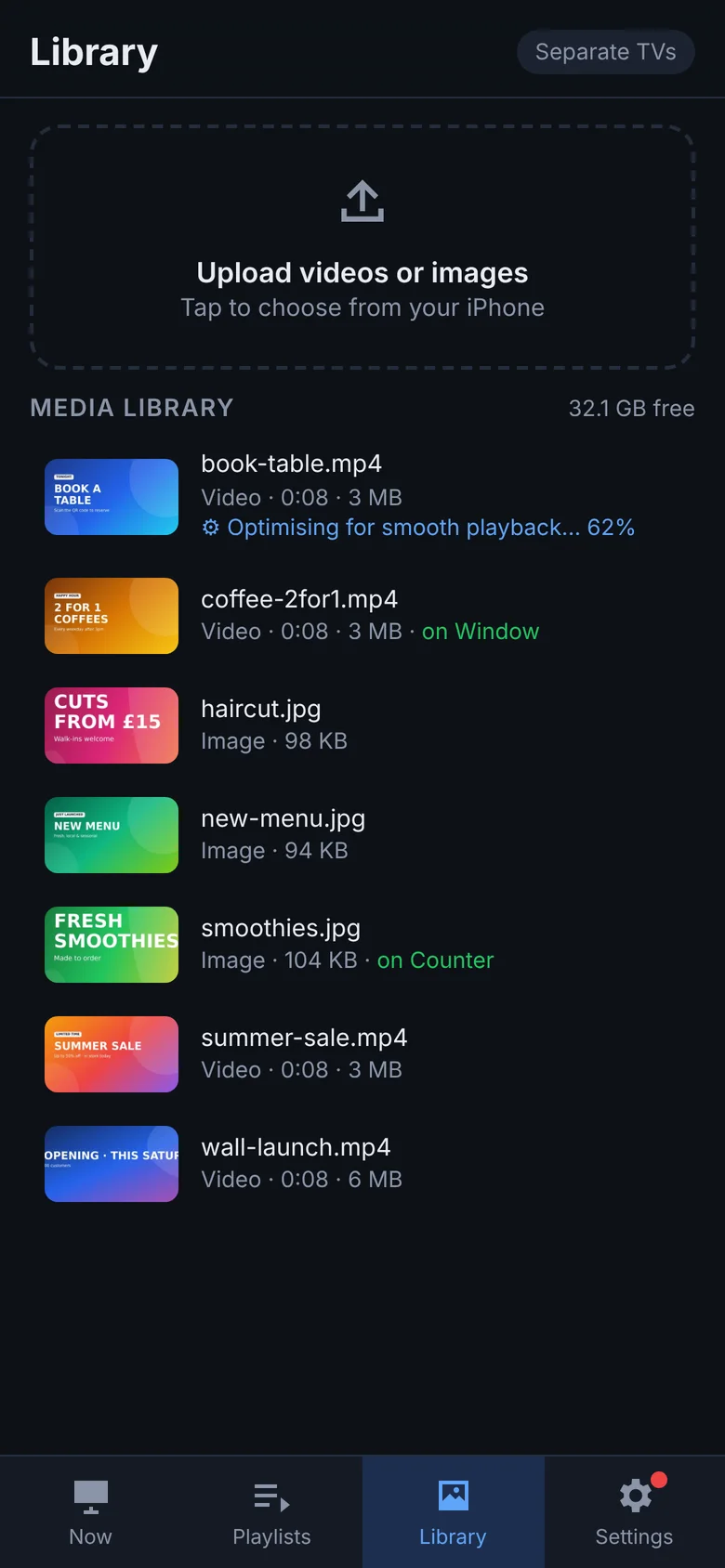
  • Automatic optimising: videos the Pi would struggle with (like big iPhone clips) are converted in the background for smooth playback.
  • See at a glance what's playing on which TV.
  • Preview, rename or delete from your phone.
  • An empty playlist plays your whole library, so new uploads go live by themselves.
Media library with thumbnails and optimising progress
Playlist editor
QR codes

Generated QR codes, on the screen and in the corner you choose

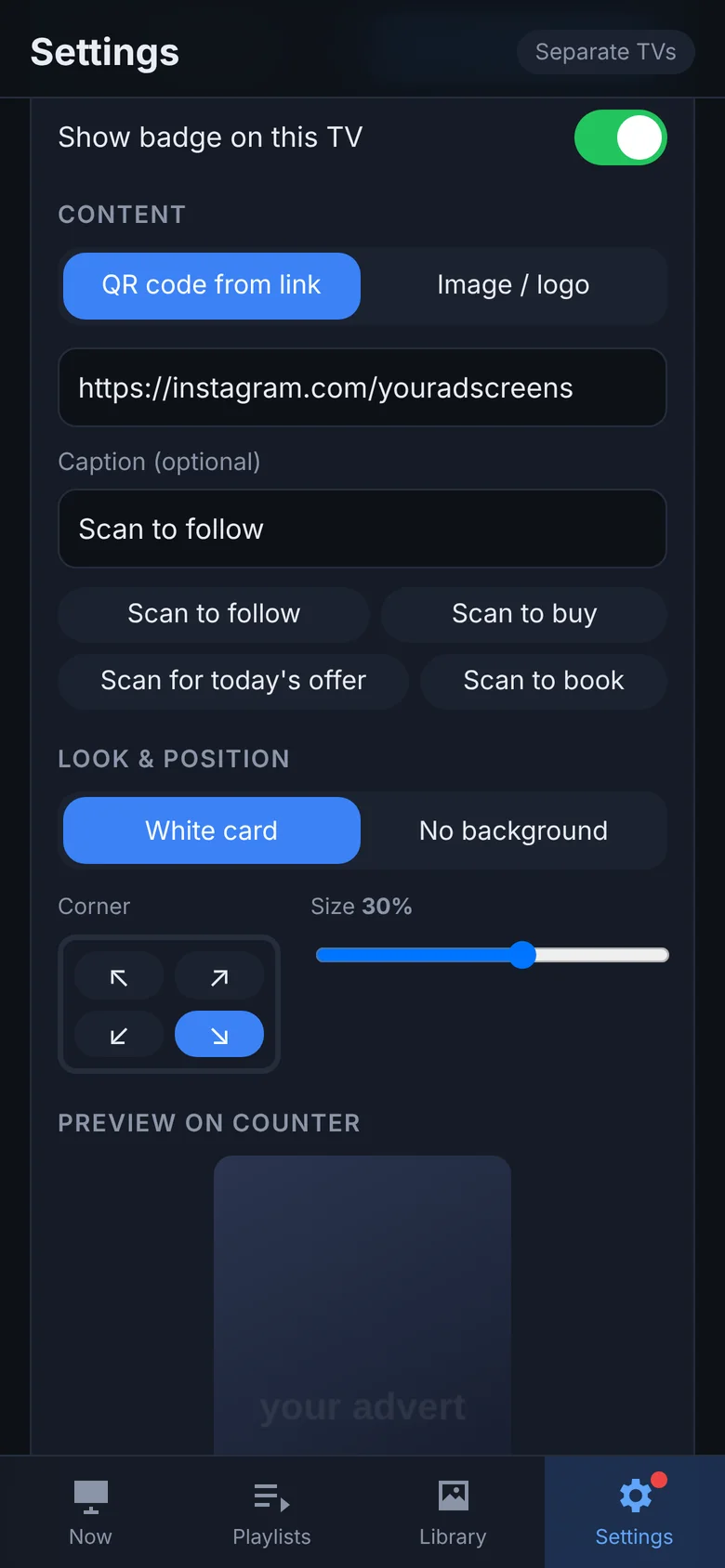
Turn passers-by into followers and customers. AdScreen makes the QR code for you: just paste a link.

  • Paste any link (Instagram, your shop, menu or booking page) and the QR code is generated instantly.
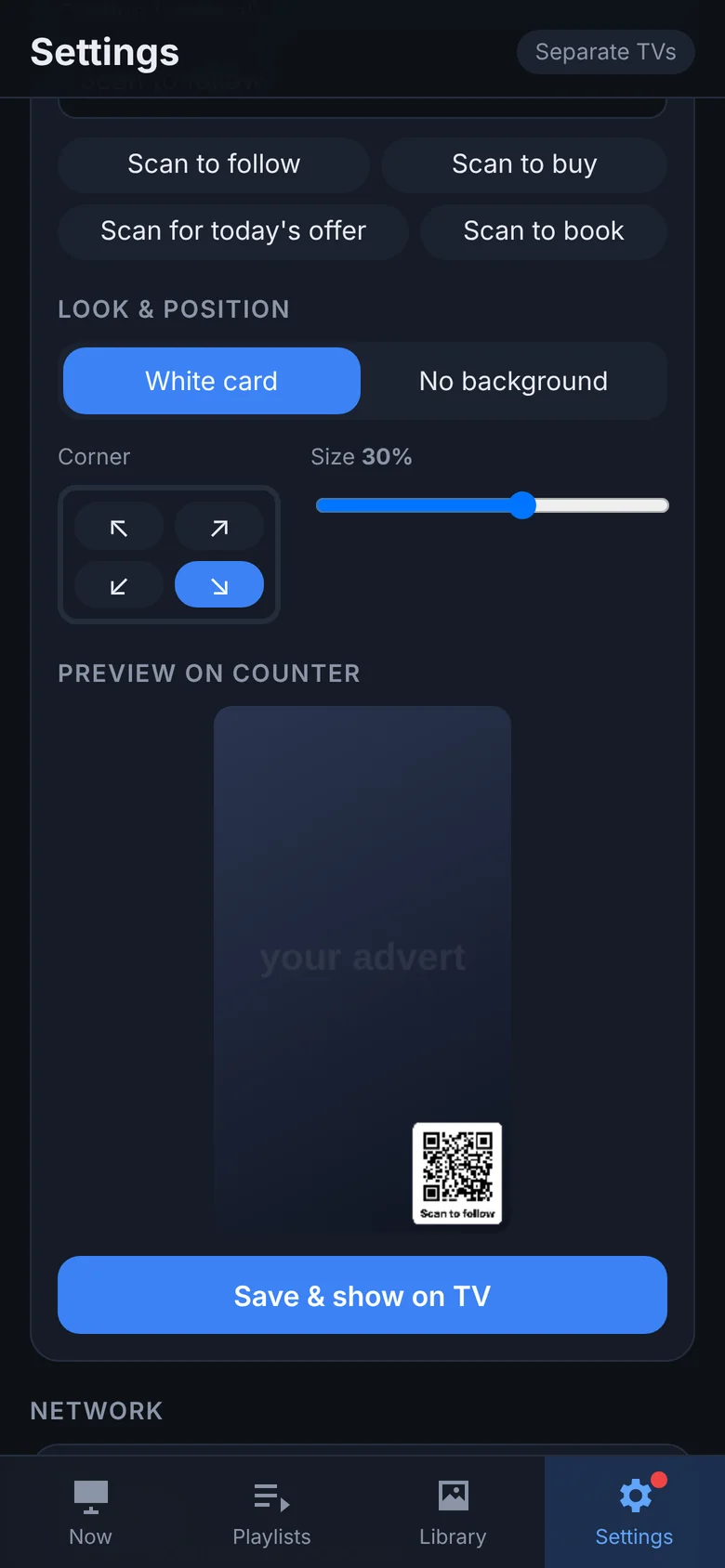
  • Pick the screen (TV 1, TV 2 or both) and the corner (top or bottom, left or right).
  • Set the size, add a caption like "Scan to follow" or "Scan to book", and choose a white card or no background.
  • Use your logo or any image instead.
  • It stays on top of every advert, so you never need to edit your videos.
QR code designer: link, caption, style
Choose the corner and size with a live preview
Updates

Easy updates, from your phone

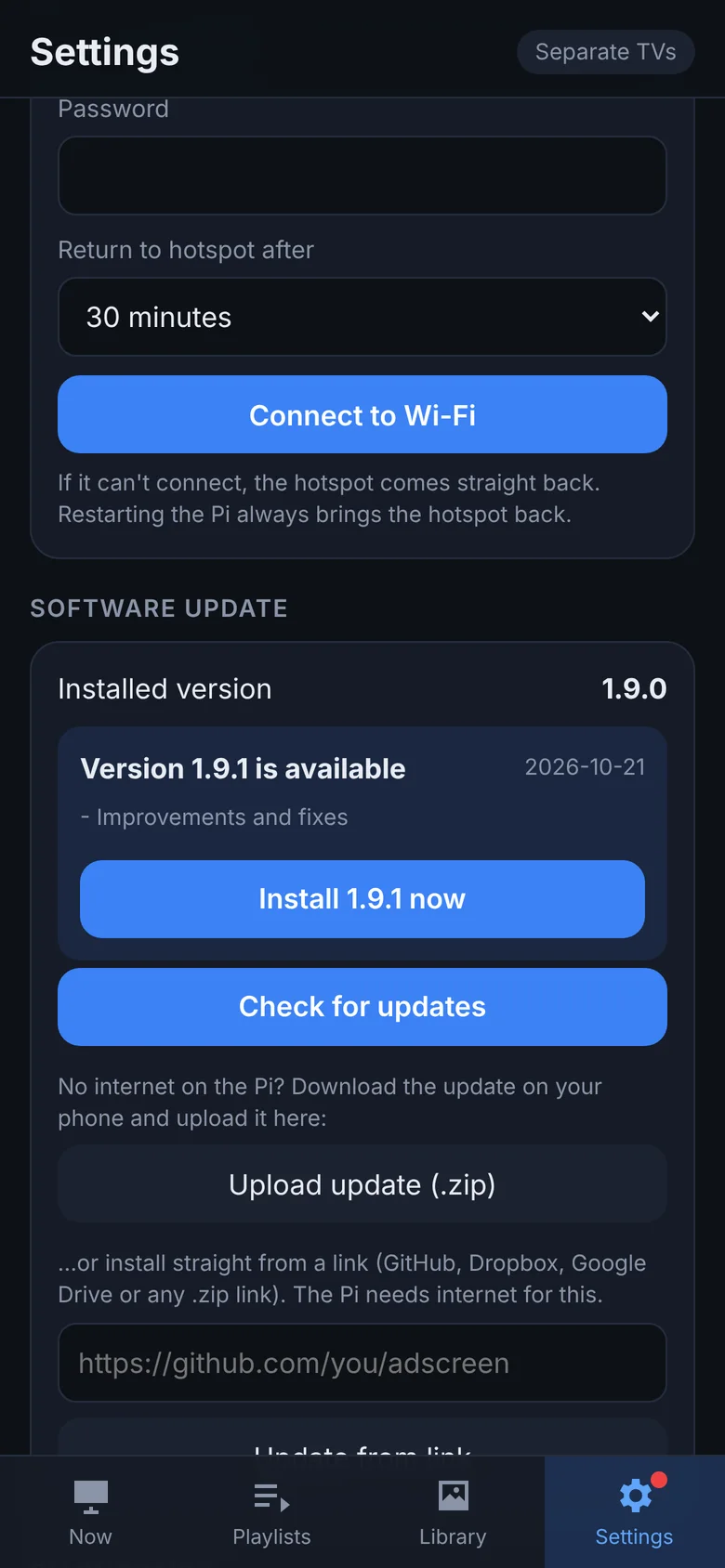
New features and fixes arrive as free updates, and installing one takes a single tap.

  • AdScreen checks for updates by itself, and a red dot tells you when one's ready.
  • See what's new, tap Install, done. Your adverts, playlists and settings are kept.
  • Every download is checked before it's installed.
  • No internet at the Pi? Upload the update file from your phone instead.
Software update with one-tap install
Setup wizard

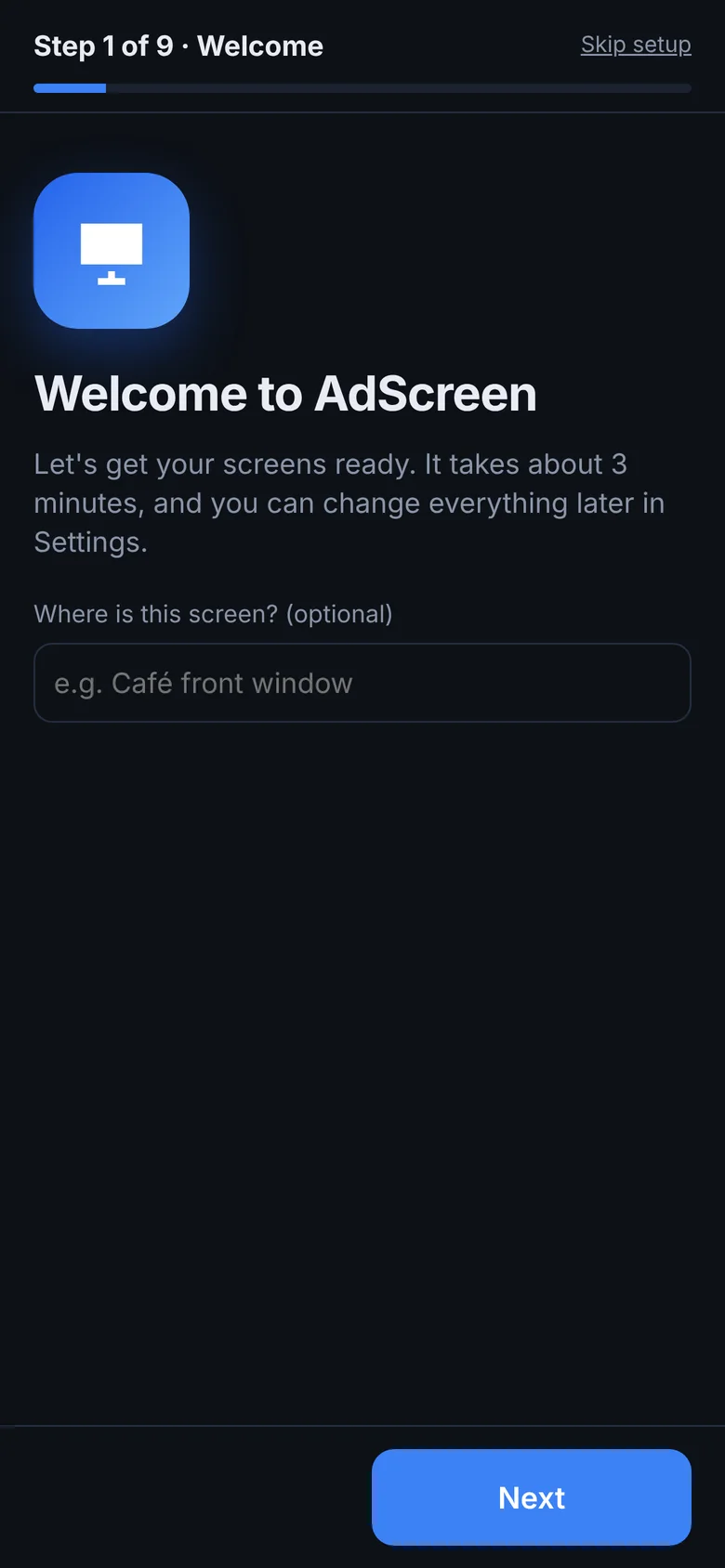
Set up step by step, in about 3 minutes

The first time you open AdScreen, a friendly wizard walks you through everything.

  • Choose your password.
  • Find your TVs, name them, and check which is TV 1 and which is TV 2.
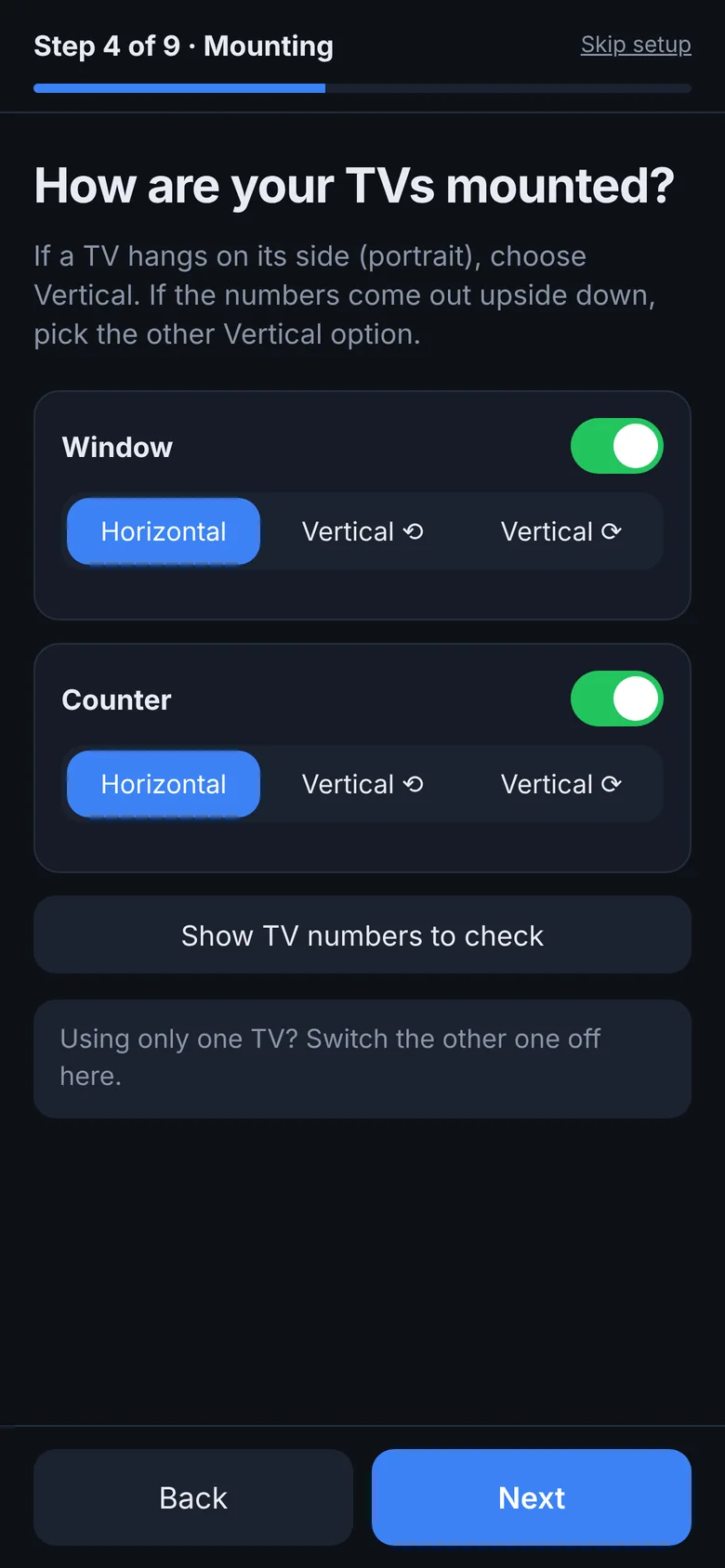
  • Tell it how each TV is mounted (landscape or portrait).
  • Pick your layout, picture and sound.
  • Set up the Wi-Fi hotspot, then upload your first adverts and QR code.
Setup wizard: how are your TVs mounted
Setup wizard: choose a layout
Works without Wi-FiThe Pi makes its own "AdScreen" Wi-Fi, so your phone connects straight to it. It can also join your shop Wi-Fi.
Network buttonTwo pins on the Pi switch between hotspot and Wi-Fi, with no phone or keyboard needed.
Runs all day, every dayIt starts automatically when the power comes on, and a watchdog recovers from problems by itself.

Take a look around

These are real screenshots of the AdScreen control page on a phone. Swipe to see more.

Pick your layout

Switch between layouts in seconds from Settings, with no re-wiring.

Side by sideOne wide picture
StackedOne tall picture
Portrait wallTVs on their side
12SeparateDifferent content per TV

Every feature, at a glance

All included in the one-time £9.99, with free updates as new features arrive.

Screens & layout

  • 1 or 2 TVs from one Raspberry Pi
  • Side-by-side video wall
  • Stacked video wall
  • Separate content per TV
  • Swap TV 1 / TV 2
  • Show TV numbers on screen
  • Name each TV

Rotate & power

  • Horizontal / vertical (both directions) per TV
  • Mixed portrait + landscape walls
  • Turn each TV on/off from the app
  • TV standby & wake via HDMI-CEC
  • Blank a screen instantly
  • Automatic TV detection & resolution
  • 4K or 1080p output

Playback

  • Videos & images (MP4, MOV, MKV, JPG, PNG…)
  • Play now / play next queue
  • Looping playlists per screen
  • Whole-library loop when a playlist is empty
  • Fit / Fill / Stretch picture
  • Sound on TV 1, TV 2 or off
  • Image display time

Phone control

  • Works in any phone browser, no app
  • Live view of the TVs
  • Upload straight from your camera roll
  • Preview, rename & delete media
  • Password protected
  • Add to Home Screen like an app

Marketing

  • QR code badge from any link
  • Ready-made captions or your own
  • Logo / image badges
  • Any corner, any size
  • Card or no-background style
  • Different badge per TV

Reliability & updates

  • Starts automatically on power-up
  • Watchdog auto-recovery
  • Automatic video optimising for smooth playback
  • Playback health & temperature check
  • Built-in log & one-tap diagnostics
  • One-tap updates from your phone
  • Own Wi-Fi hotspot + network button

Up and running in an afternoon

No coding needed. Clear step-by-step instructions are included.

Download & install

Flash Raspberry Pi OS, copy AdScreen onto the Pi and run the one-line installer. It sets everything up for you.

Plug in your TVs

Connect one or two TVs by HDMI. AdScreen detects them, numbers them on screen and picks the best resolution.

Follow the setup wizard

Open the control page on your phone. A step-by-step wizard sets up your password, TVs, rotation, layout, sound, Wi-Fi and first adverts, and you're live.

What you'll need

AdScreen is software. You supply the hardware, which costs much less than a typical signage player.

  • Raspberry Pi 5Recommended for smooth 4K on two TVs. A Raspberry Pi 4 works well at 1080p.
  • microSD card32 GB or larger (or an SSD on a Pi 5).
  • 1 or 2 TVsAny TV with HDMI, from HD up to 4K.
  • Micro-HDMI cablesOne per TV, plus the official Pi power supply.
  • A phoneiPhone or Android, using the web browser. No app needed.

Plays your content

  • VideoMP4, MOV, MKV, WebM and more. HEVC/H.265 and H.264, up to 4K.
  • ImagesJPG, PNG and WebP, shown for as long as you choose.
  • Made in CapCut / Canva?Export as MP4 and upload. AdScreen optimises anything the Pi would struggle with.
  • Promo badgesA QR code from any link, or your logo, in any corner.

One price. Yours to keep.

No subscription and no per-screen licence. Pay once, use it on your screens for as long as you like.

One-time payment
£9.99 one-time

Instant download after payment

  • AdScreen software for Raspberry Pi 4 & 5
  • Phone control panel: upload, playlists, play now/next, live view
  • Video wall, stacked, portrait and separate-screen layouts
  • QR code promo badges, Wi-Fi hotspot and auto-optimised video
  • Step-by-step install guide + setup wizard
  • One-tap updates from the Settings page
  • Email support
  • Open source (MIT licence): use it, change it, keep it
Secure checkout with PayPal. Use your PayPal account or pay by card, no account needed.

Most cloud signage services charge every month, for every screen. AdScreen is a single payment.
AdScreen is open source. Your £9.99 buys the ready-to-install package, the step-by-step guide, one-tap updates and support, and it funds further development.

Questions

It's open source, so why pay?

The code is open under the MIT licence, and you're welcome to read it, change it and build it yourself. The £9.99 gets you the tested, ready-to-install package with the installer and guide, one-tap updates from your phone, and email support. It also keeps the project going.

How do I pay?

Securely through PayPal, either with your PayPal account or by debit/credit card without one. You'll get a PayPal receipt by email and go straight to the download page.

Can the two TVs show different things?

Yes. In "Separate" mode each TV has its own playlist, queue, QR code and sound setting. Switch to "Side by side" or "Stacked" any time to join them into one big picture.

Can I rotate one TV and not the other?

Yes. Each TV can be Horizontal, Vertical ⟲ or Vertical ⟳ on its own, and the picture rotates to match.

Will it work with my TVs?

Any TV with HDMI works, from HD up to 4K. AdScreen detects each TV and its resolution automatically. Turning TVs on and off from your phone needs HDMI-CEC, which most modern TVs support.

Do I need internet at the shop?

No. The Pi makes its own Wi-Fi network, so your phone connects straight to it. If you do have Wi-Fi, AdScreen can join it so you can manage the screens from anywhere on that network and install updates from a link.

Raspberry Pi 4 or Pi 5?

Both work. A Pi 5 drives two 4K TVs smoothly. A Pi 4 runs best at 1080p output, which the TVs upscale, and AdScreen selects this automatically.

Can I use just one TV?

Yes. AdScreen works with one or two TVs, and you can add the second later.

How do I get updates?

Updates are free. Install them from the Settings page on your phone by uploading the update file or pasting a link. Your media, playlists and settings are kept.

Is it hard to install?

If you can copy a file and paste a command, you can install AdScreen. The installer configures the Pi and auto-start for you, then a step-by-step setup wizard on your phone takes you through the TVs, rotation, layout, sound, hotspot and your first adverts.

Can I run it on more than one Pi?

Yes. It's open source, so you can install it on as many of your own screens as you like. If it's useful in several locations, buying a copy for each helps support the project.

What if it doesn't work for me?

Email us and we'll help. If you're not happy, ask within 14 days for a full refund.
Get your screens working for you today

£9.99 once. No contracts, no monthly fees.

Buy AdScreen · £9.99
AdScreen
£9.99 one-time
Buy now